Every channel that costs money to sell through sits on one ledger: Google Ads, Meta Ads, your affiliate network, email and any other. Marketing has two pages. Ad spend shows the money. Marketing desk shows what your marketing manager wants to do about it.
Who works here
Marian, the marketing manager, reads every channel against your own orders, writes a recommendation wherever the numbers say something, and acts on it as far as you allow. Andrew, reporting, uses the same ledger for the store's contribution margin; without ad rows he reports it as not computable rather than as zero.
Two readings of revenue
Every ad platform reports the sales it believes it caused, on its own attribution window. Your store can also trace an order to the ad that was last clicked before it. The two rarely agree, and the pages always show both, labelled. ROAS · ours is revenue you can trace divided by spend. ROAS · platform is what the platform claims. The Attribution gap is their claim as a multiple of yours. Marian decides on your reading, never on the platform's.
Connecting an ad account
Ad accounts are connected at Settings → Integrations.
Google Ads: your store has its own Google Ads email, shown on the Google Ads row.
- In Google Ads, add it as a user: Admin → Access and security → Users → +. Standard access lets approved changes be carried out; Read only records them instead.
- Back on the row, press Check access and choose the account.
Meta Ads: press Connect with Meta, sign in and allow access to your ad accounts, then choose the account.
Nothing is typed into your store, and no key is kept there.
Once connected, the last 90 days are read in at once, then the account is read every few hours. The page then says which account it is reading and who connected it. On Google Ads, Stop reading ends it; remove the email under Users in Google Ads to take the access away completely. On Meta, Sign in to Meta again renews the access, and Disconnect ends it.
On Google and Meta, approved budget changes and pauses are carried out on the platform itself while the account is connected; on Affiliates and Email, and on a disconnected account, the change is recorded and carried out by a person.
Google Ads and Meta Ads are the two accounts you can connect. The Affiliates and Email rows have no Connect button and read Not connected: they count the orders your store traces to them, with no spend of their own.
Ad spend
Marketing → Ad spend opens on four figures for the period: Spent, Our revenue from ads, Blended ROAS (all store revenue divided by all ad spend, the honest number) and Net ROAS (traced orders only, with the cost per order). Under them, a line says what currencies were converted and how far the platforms' claims run ahead of what you can trace.
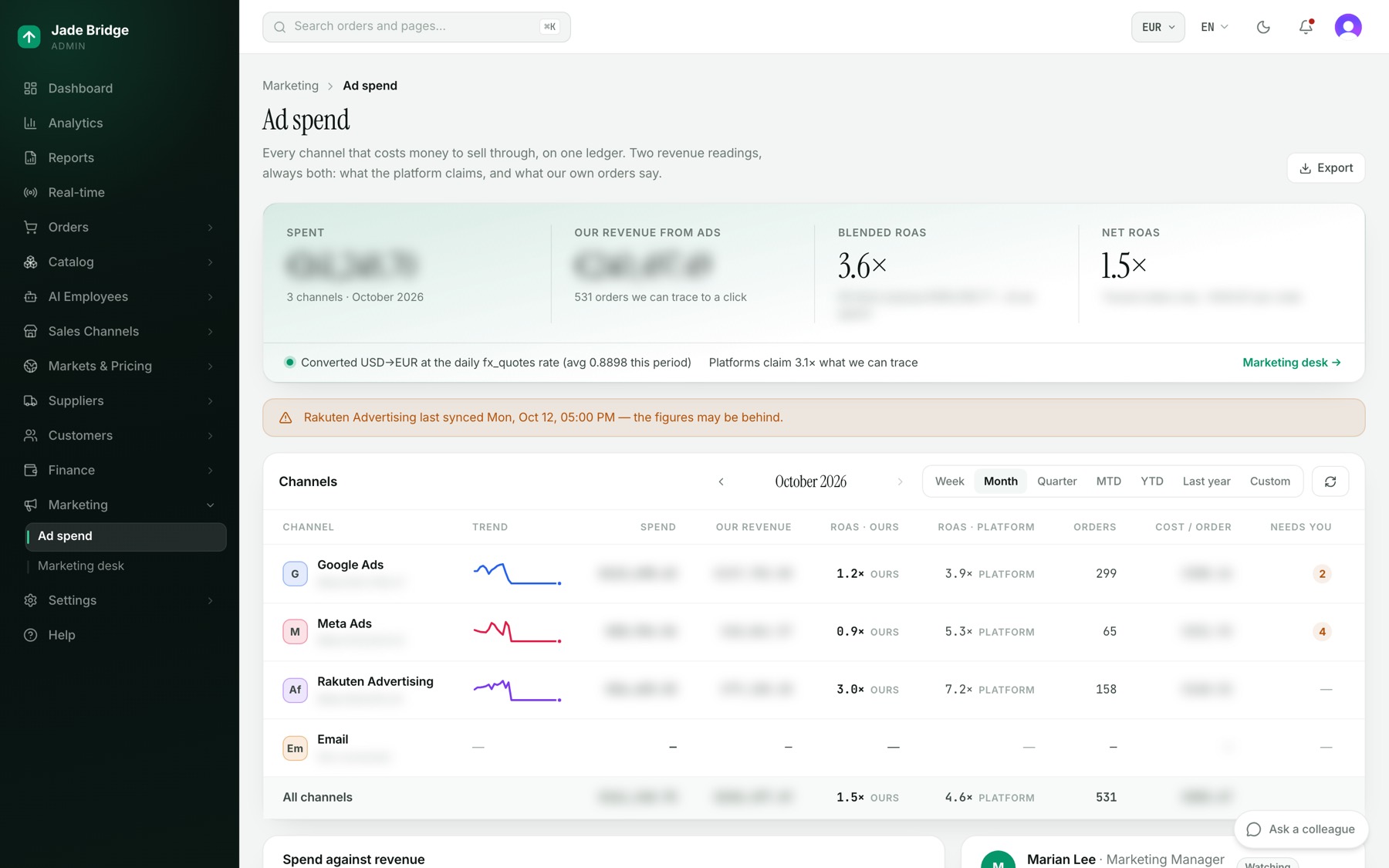
The Channels table has one row per channel: Trend, Spend, Our revenue, ROAS · ours, ROAS · platform, Orders, Cost / order, and Needs you, the number of proposals waiting on that channel. Choose the period on the table. A channel last synced more than a day and a half ago gets a warning above the table. Below sit the Spend against revenue chart and Marian's latest proposals. Export saves the Channels table for the chosen period as a CSV file.
One channel
Opening a row shows that channel.
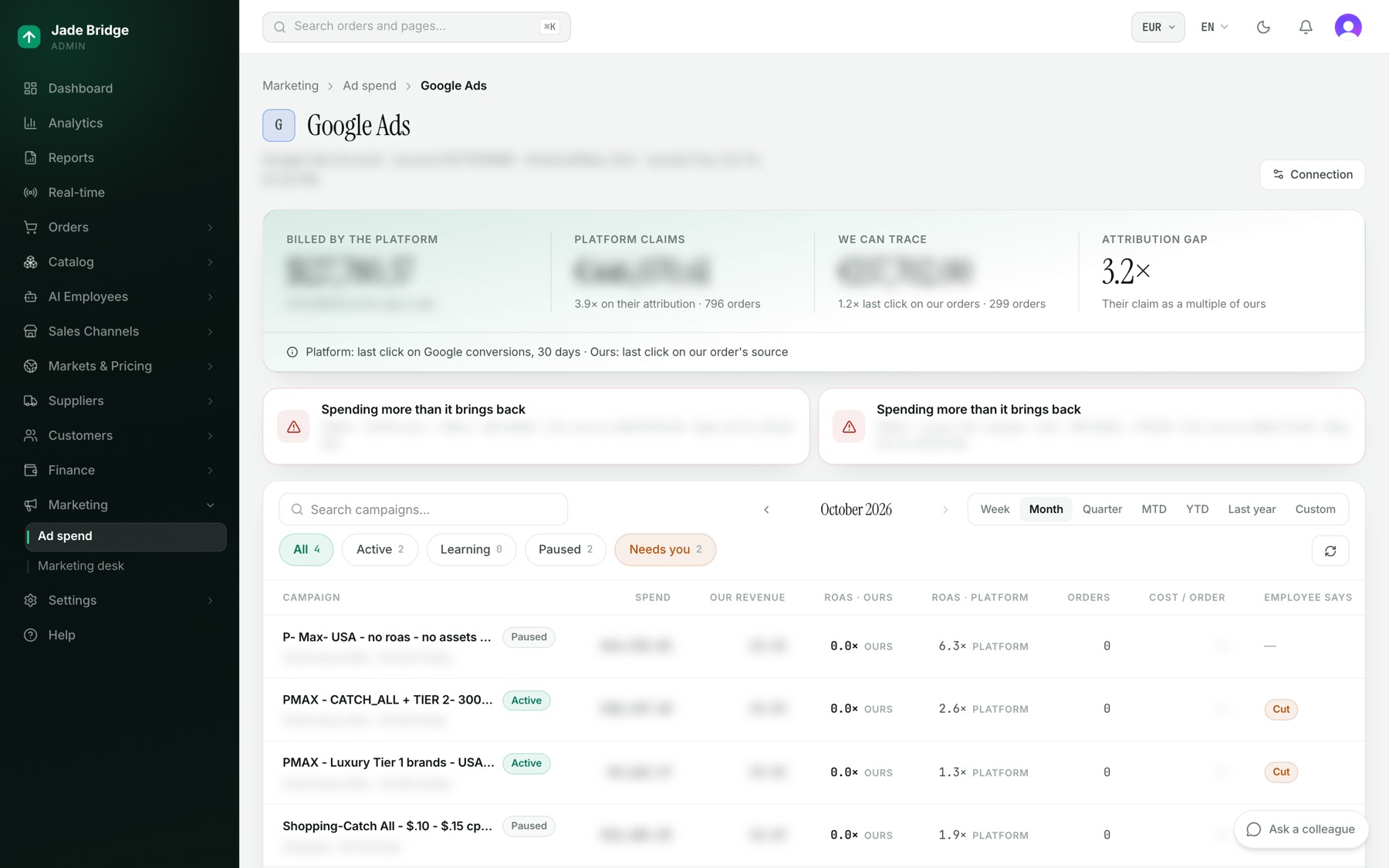
- Billed by the platform, in the platform's currency and in yours.
- Platform claims, and We can trace, each with its ROAS and orders.
- Attribution gap, with the two attribution rules named underneath.
- The campaigns, searchable, filtered by All, Active, Learning, Paused or Needs you. The Employee says column is Marian's stance on each: Scale, Hold, Watch, Cut or Pause.
- Recommendations for this channel, with Approve and Decline.
The Connection button at the top opens this channel's page on Settings → Integrations, where its account is connected.
Opening a campaign shows its figures, a Day by day table with clicks and impressions, Marian's note on it, and every decision taken on it. Two buttons sit at the top:
- Take it back puts the campaign in a person's hands: Marian stops proposing to raise its budget. Cuts and pauses can still be proposed, and wait for you. Hand to the employee returns it.
- Protect puts the campaign on the protected list. Marian proposes nothing on a protected campaign and never changes it without asking a person, whatever the dial says. It shows a Protected tag. Unprotect takes it off.
The marketing desk
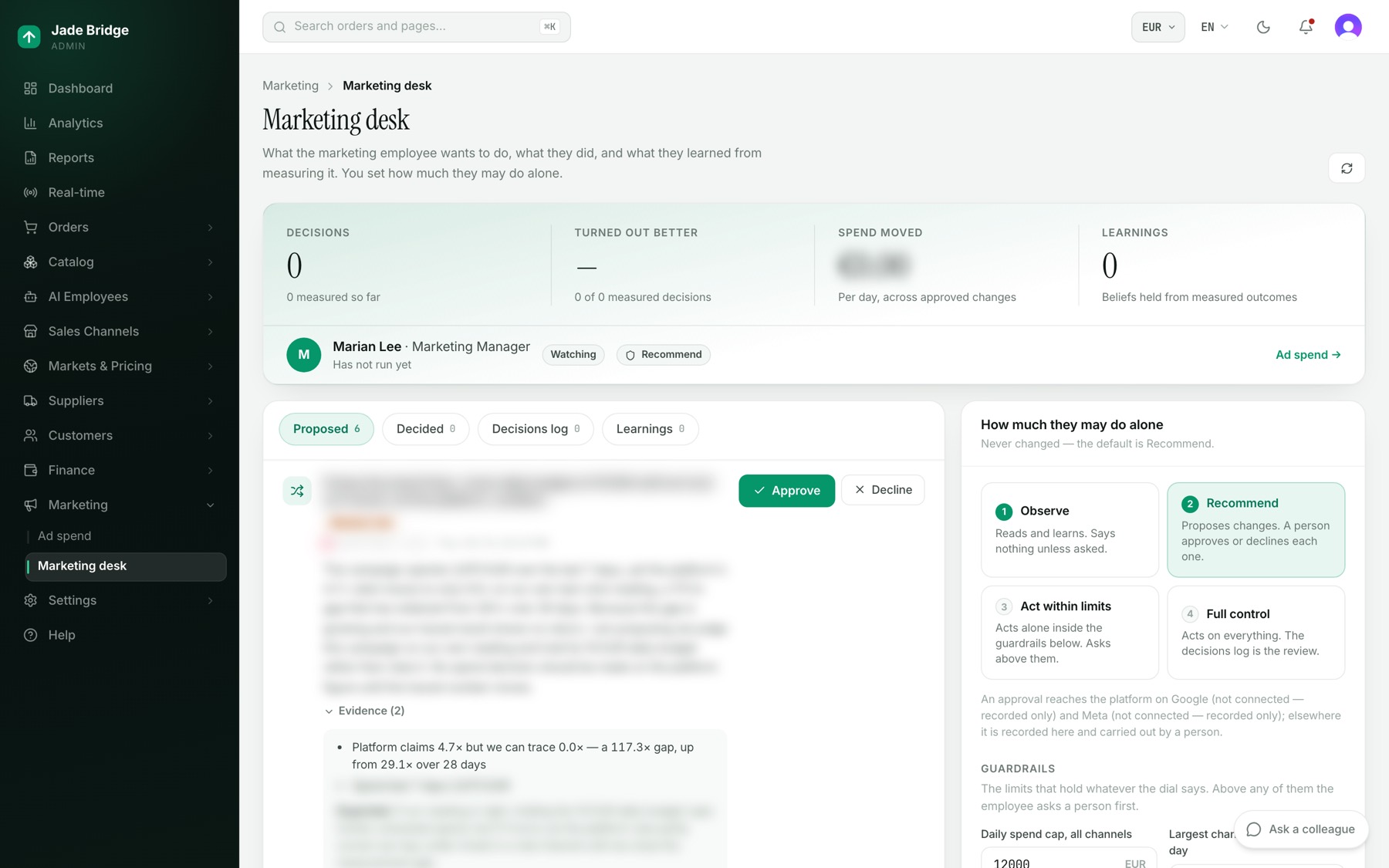
Marketing → Marketing desk is Marian's record. The band counts Decisions, the share that Turned out better, the Spend moved per day by approved changes, and Learnings.
The tabs:
- Proposed: what Marian wants to do now. Each card has a title, a risk (Low, Medium or High), the campaign, the change per day in your store's currency, the reasoning, the Evidence and what is Expected. A card held for you says why, for example that a change is above the ask line.
- Decided: what was approved, declined or done.
- Decisions log: every action, who took it, and its result once measured: Better, Worse or No change.
- Learnings: what held across measured decisions, with how often it held.
To decide a proposal:
- Open Proposed and read the reasoning and Evidence.
- Press Approve or Decline. A declined proposal is not raised again for 14 days.
Fourteen days after a change is carried out, Marian reads the campaign back and records whether it did better, worse or the same on your own ROAS. A change smaller than the noise band counts as the same.
The dial
How much they may do alone sets what happens to a recommendation. It starts on Recommend.
- Observe: reads and learns. Says nothing unless asked.
- Recommend: proposes changes. A person approves or declines each one.
- Act within limits: acts alone inside the guardrails. Asks above them.
- Full control: acts on everything. The decisions log is the review.
Under the dial, a note says whether approved changes reach Google and Meta, or are recorded only and carried out by a person.
The Guardrails hold whatever the dial says:
- Daily spend cap, all channels: an amount in your store's currency — by default what 12,000 euros come to in it. Marian never takes total daily spend above it alone.
- Largest change to one budget per day: 25%. A bigger change waits for you under Act within limits.
- ROAS floor (ours, 7 days) before a cut: 2×. A campaign under it for a fortnight becomes a cut candidate.
- Ask first above this per day: an amount in your store's currency — by default what 500 euros come to in it. A change that moves more than this per day always waits for you, even under Full control.
Change a value and press Save guardrails, or Revert to undo. The line beside them counts the protected campaigns Marian never touches. To protect or unprotect one, open it from its channel and press Protect or Unprotect.
What comes to you
Proposals wait on the desk and in the Needs you column. Under Observe or Recommend every change waits for you; under the other two positions, only what crosses a guardrail. Money beyond the guardrails always waits.